Field notes
Host Flask and Django Web Application wit windows IIS FastCGI
Originally published on Medium.
Internet Information Services(IIS) is a software package tool for hosting websites.
FastCGI
FastCGI provides high-performance interfacing between the web server and CGI programs, which allows the server to handle more requests.
To access the FastCGI module, enable CGIFeature.
In Windows 7,8,10
- Open Turn Windows features on or off.
- Click on IIS -> World Wide Web -> Application Development Features-> CGI . This will on both CGI and FastCGImodules.
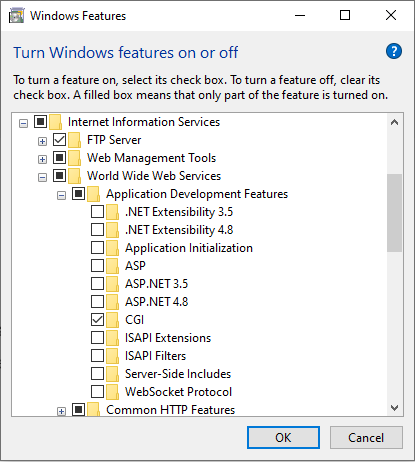
IIS Window Add Website
In Windows Server
- On the taskbar, click Server Manager.
- In Server Manager, click the Manage menu, and then click Add Roles and Features.
- In the Add Roles and Features wizard, click Next. Select the installation type and click Next. Select the destination server and clickNext.
- On the Server Roles page, expand Web Server (IIS), expand Web Server, expand Application Development, and then select CGI. ClickNext.
Let us configure wfastcgi to host python web apps using IIS FastCGI.
pip install wfastcgi
Enable the wfastcgi access by the below command.
wfastcgj-enable
This will provide you access to the script processor. for eg.
c:\users\user\appdata\local\programs\python\python36\python.exe|c:\users\user\appdata\local\programs\python\python36\lib\site-packages\wfastcgi.pyFlask APP with FastCGI
Flask App With FastCGI
- Let’s create a module handler for the flask app using FastCGI.
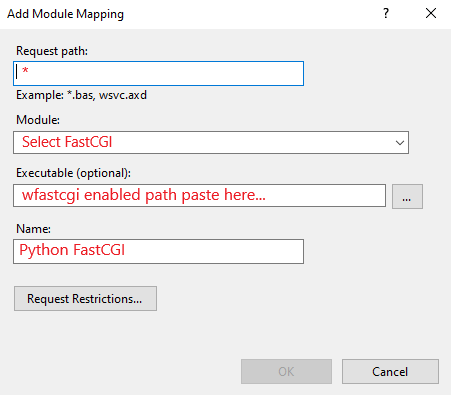
- To avoid all manual process add below web.config to the flask app directory or you canrefer
<configuration>
  <system.webServer>
    <handlers>
      <add name="Python FastCGI"
           path="*"
           verb="*"
           modules="FastCgiModule"          scriptProcessor="c:\users\user\appdata\local\programs\python\python36\python.exe|c:\users\user\appdata\local\programs\python\python36\lib\site-packages\wfastcgi.py"
           resourceType="Unspecified"
           requireAccess="Script" />
    </handlers>
  </system.webServer>
<appSettings>
    <!-- Required settings -->
    <add key="WSGI_HANDLER" value="run.app" />
    <add key="PYTHONPATH" value="C:\flaskapi"/>
  </appSettings>
</configuration>
Let us understand the web.config of FastCGI.
- The handlers are the main component of FastCGI module mapping for the current website.
- The scriptProcessor is the key to run your WSGI application. For eg. in the flask defined app is your WSGI application.
- This handler will process your web application.
- The appSettings is are get translated to the environment variable to run the application.
- PYTONPATH is the physical path to your flaskapp.
- WSGI_HANLER is the WSGI app. As shown above web.config in flaskapp run.py is accessed as run.app so scriptProcessor can access it.
- For more detailed configuration. here
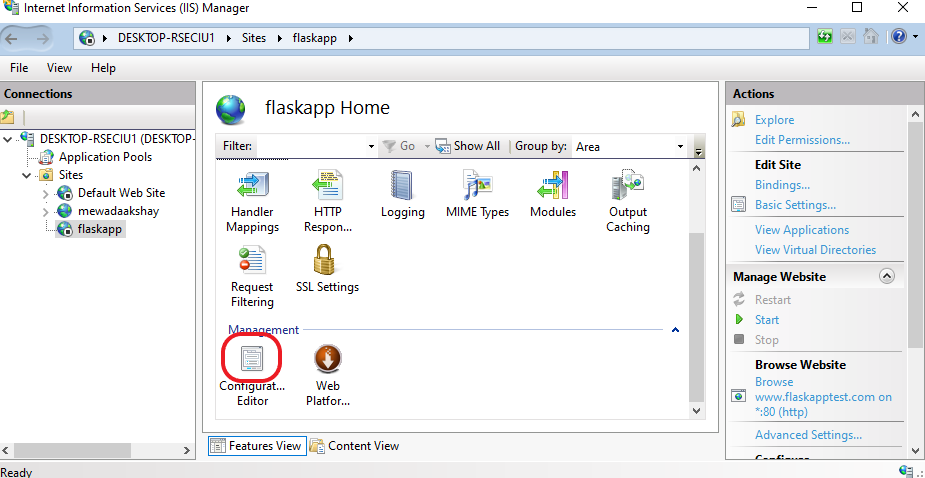
flaskapp
In the configuration editor, you will find the below details.
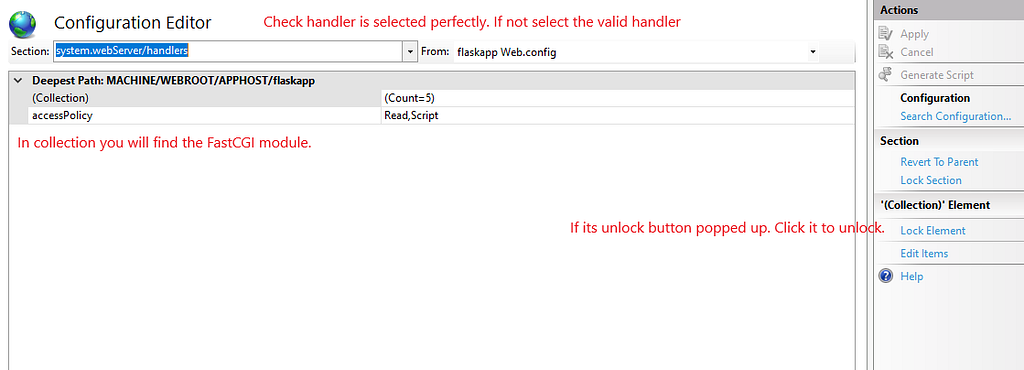
If you didn’t found configuration or it is throwing an error of web.config. Please check the web.config file. To check it and troubleshoot it in detail the references are shown at the end of the post.
After successful configuration, If you run your web application at this point it will throw access denied error because the flaskapp application has no permission to access the folder.
Add Permission to Flask Application and Python folder where your executable is present.
- Open folder properties.
- In Security click on Edit then click on Add
- Enter object name as IIS AppPool<yourappname>
- Click on the check name if its present click ok and allow permissions you wanted to give then apply it.
- This link will help you with permissions. here.
Run your application
Click on the website added in Sites. Go to manage website click on start to run your application.
Django App With FastCGI
- Add web.config file to the path of the Django application.
<configuration>
  <system.webServer>
    <handlers>
      <add name="Python FastCGI"
           path="*"
           verb="*"
           modules="FastCgiModule"         scriptProcessor="C:\Python36\python.exe|C:\Python36\Lib\site-packages\wfastcgi.py"
           resourceType="Unspecified"
           requireAccess="Script" />
    </handlers>
  </system.webServer>
  <appSettings>
    <!-- Required settings -->
    <add key="WSGI_HANDLER" value="myweb.wsgi.application" />
    <add key="PYTHONPATH" value="C:\MyWebApp" />
    <!-- Optional settings -->
    <add key="WSGI_LOG" value="C:\Logs\my_app.log" />
  </appSettings>
</configuration>
- Here the WSGI_HANDLER value is the same as WSGI_APPLICATION value defined in setting.py of Django application.
- Follow the same procedure of flask application with FastCGI to make the Django application running.